Go to your organization's Integrations page in Askribe
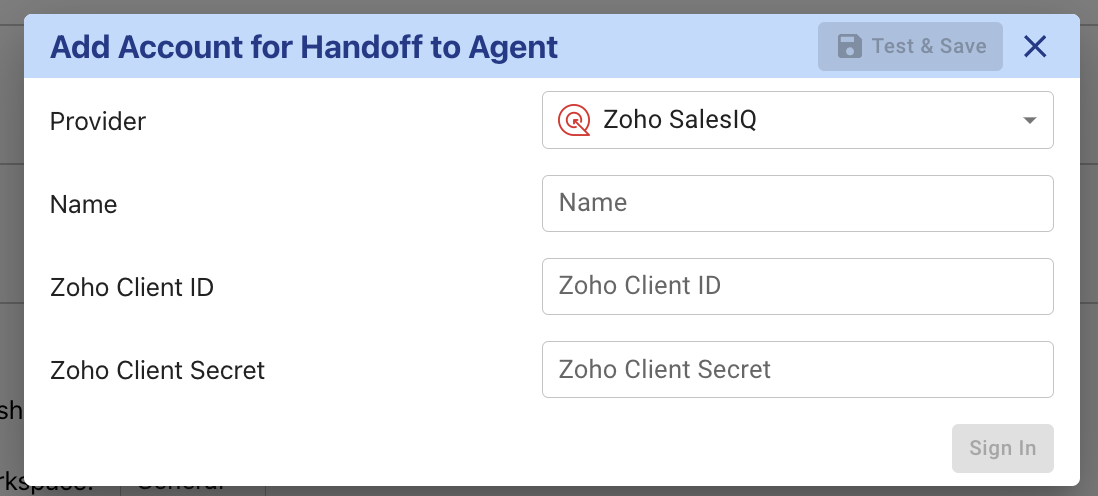
From the Handoff to Agent section, click on the + Account button
Give a custom name for your integration.
To obtain the details for the API connection, follow the steps for "Server side application" as outlined here
In the Client name field, put Askribe
In the Homepage URL field, put https://askribe.askribe.com/
In the Redirect URL field, put https://common.askribe.com/oauth_redirect
Click on Save which will take you to Client Secret Panel
Copy the Client ID and Client Secret and paste it in the corresponding fields in the Askribe integrations page.
In the Asktibe Integrations page, click on Sign In
You will be redirected to Zoho to authorize the connection
Once you have authorized the connection, you will be redirected back to Askribe. Click on Save
Select the workspace where you want to use this integration
Click on Save
That's it! You have successfully connected your Zoho SalesIQ account to Askribe. Now you can use this integration in the Handoff to Agent block in your Conversational flows.